
Solutions › Embedded Edge AI › Retail Video Analytics

Retail Video Analytics

Coming soon

Embedded Edge AI · Footfall, dwell and queues from the cameras already in store

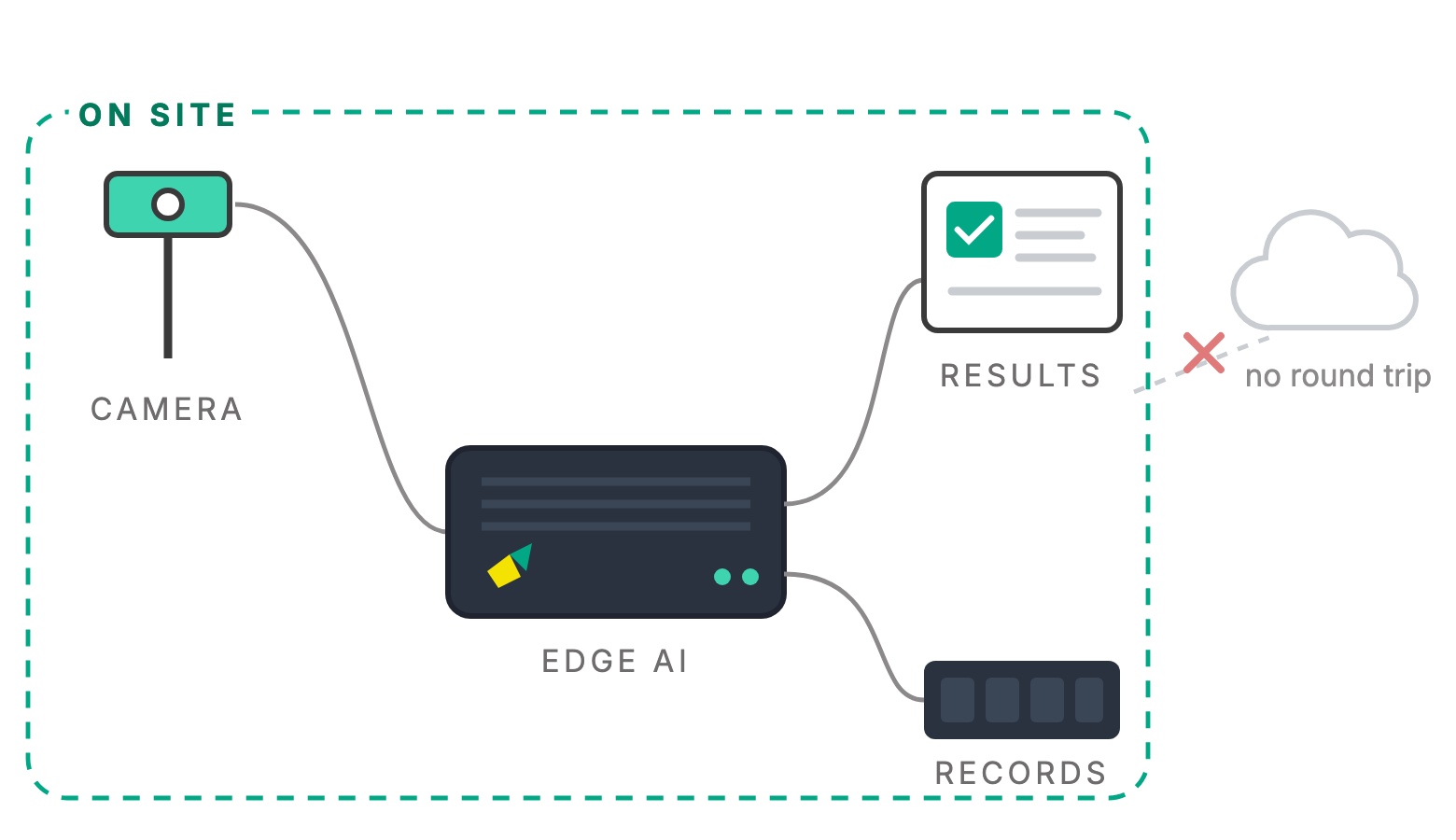
The cameras already watching your store can also count it. Retail Video Analytics is designed to turn what they see into footfall at each entrance, time spent in each zone, how long the queue is at the tills and where people actually walk, as numbers by the hour. The analysis runs on a small computer in the store, so the numbers come out and the footage stays in.

Counts people; does not identify them. Runs on hardware in your store.

Illustration of the planned store screen, with example figures. It is not customer data.

Counted by hand, or not at all

Most stores know what they sold, and not who walked past it. Takings are exact. Visitors are a guess, a clicker at the door or a beam that counts crossings. Without a visitor number there is no conversion rate, no honest way to staff the tills for the afternoon, and no evidence for moving a display.

The gaps are ordinary ones, and none of them is anybody being careless:

Visitors guessed, or counted by a beam. A beam counts crossings, so two people walking in side by side can register as one, and a member of staff popping out for a coffee registers as another.

No time in store, no zones. You know the till total. You do not know whether the promotion at the end of the aisle stopped anyone.

Queues noticed late. A queue is found by someone looking up from the shelves, usually after some customers have already put their baskets down and gone.

Displays moved on instinct. A layout change is judged on a feeling, and a week later nobody can say whether it worked.

 
Clicker or beam counter
Camera analytics
What is counted
Crossings of a line
People, entering and leaving separately
Time in store and in zones
Not measured
By zone, as averages
Where people walk
Not measured
A heat map of walking and stopping
Queues at the tills
Someone watching
Live length and estimated wait
Staff
Counted with shoppers
Kept apart from shoppers
Hardware
A sensor at each door
Often the cameras already in store

Comparison of method, not a benchmark. Count accuracy is checked against a manual count in your store during the site survey, before you rely on any number.

From picture to number

Five steps, on every camera. Nothing in them needs to know who anybody is.

Look

A camera you already have: at the door, over an aisle or above the tills.

Find

People are found in each picture. Posters, mannequins and reflections are not people.

Place

Each person is placed on a zone you drew on the camera view: entrance, aisle, display, queue.

Measure

Crossings are counted, time in each zone is timed and the queue is measured.

Summarise

Numbers go on, by hour, day and zone. The pictures stay in the store.

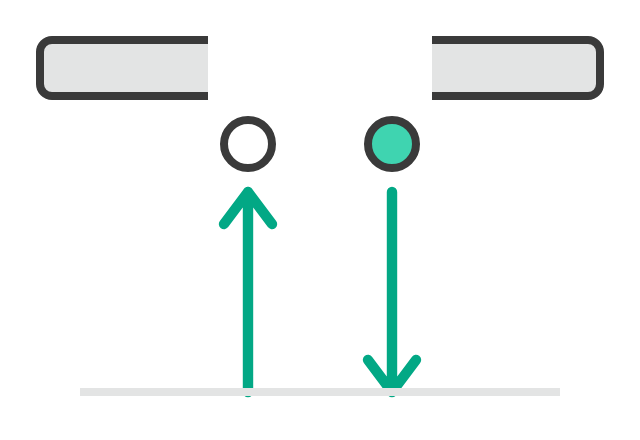
Footfall. People coming in and going out at each entrance, by direction. A group is counted as the people in it.

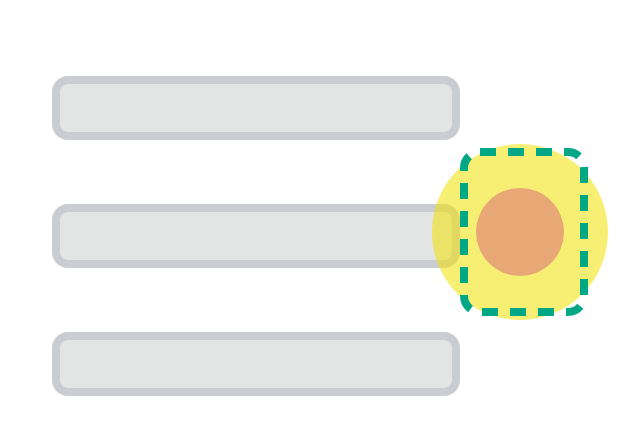
Dwell. How long people spend in a zone you have drawn, such as the display at the end of an aisle, as an average and a spread. It is not a stopwatch on any one person.

Queues. People waiting at the tills, from the length of the line, with an estimated wait. Browsing near the tills is not counted as queueing.

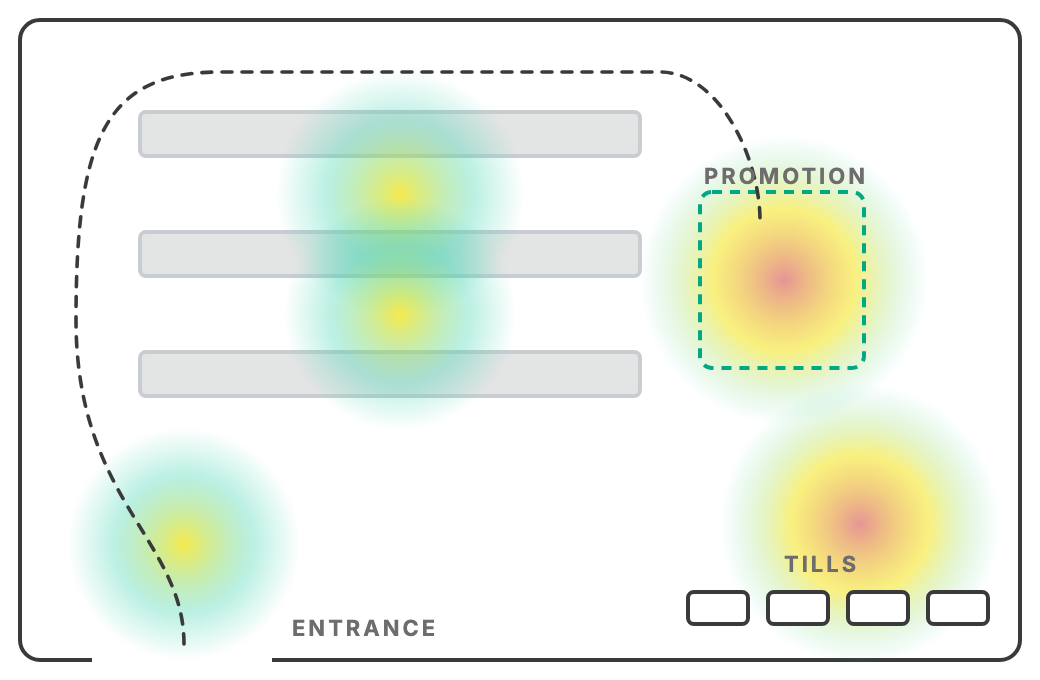
Flow. Where people walk and where they stop, shown as a heat map over your floor plan.

Occupancy. How many people are in the store right now, so a busy hour is seen as it happens.

Colour runs from fewer people (green) to more people (red). Illustration of the planned heat map on a sample floor plan, not customer data. The dashed line is a typical walking route.

Where the work happens

The model is designed to run on a small computer in the store. The cameras send their pictures a few metres, not to a data centre. The numbers appear as it happens, and the pictures stay in the building.

This is the same architecture as our Embedded Edge AI work: the model is layered onto hardware you already own, and the analysis is done at the point of capture.

The numbers arrive as it happens

A queue is only useful to know about while it is still there. The count is made in the store, not after an upload.

The pictures stay in the store

Shoppers and staff are analysed where the camera sits. What leaves is a count: how many, how long, which zone.

It keeps counting offline

Store Wi-Fi and mall networks do go down. Counting carries on, and the numbers catch up when the link returns.

What it measures

Four parts of a store, each producing numbers you would otherwise estimate, or send someone to stand and count.

Entrances

Who came in, and who passed by

Entries and exits
Direction of travel
Groups
Staff kept apart
Passers-by, where the frontage is in view
Built to give you

Footfall by entrance and by hour and, where the camera sees the frontage, the share of passers-by who walked in.

Floor & displays

Where people stop

Zones you draw
Time in each zone
Walking routes
Busy and quiet areas
Before and after a layout change
Built to give you

A heat map of walking and stopping, and dwell time for each display or aisle, so a move can be judged against a number.

Tills & queues

How long people wait

People waiting
Queue length
Estimated wait
Staffed tills
Queues that bend and merge
Built to give you

A live queue length with an estimated wait, and how often it passes the level you set.

Whole store

How busy it is, hour by hour

People in store now
Peak hours
Busiest days
Visitors against sales
Stores side by side
Built to give you

Occupancy now, the busiest hours of each week, and conversion, transactions divided by visitors, when you provide the transaction count.

Running
Warehouse tray QC

One photo per tray, items counted, barcodes read against the order, pass or hold. The same on-site approach this page builds on.

Coming soon
Retail Video Analytics

Being prepared on the same on-site approach. We will say when it is proven, and where, rather than before.

The hard cases, on purpose

A model trained only on empty stores in good light fails on the first sale weekend. These are in the plan for training deliberately, because they are what a real shop floor looks like.

Families, groups and prams

People walk in together and overlap. Each person is counted once, and a pushchair is not a person.

Staff and shoppers

A member of staff crosses the entrance twenty times a day. Staff are kept apart from shoppers, so they do not inflate footfall. How is agreed at the site survey.

Posters, mannequins and screens

A life-size poster of a person is not a visitor. These are in training as things that must not be counted.

Glass and reflections

Shopfront glass can double a person and a shiny floor can repeat one. A reflection must not become a second visitor.

Sun at the door

Midday sun through a glass entrance turns people into silhouettes, and evening brings headlights and neon. Entrances are tested at different times of day.

Sale days and festive peaks

A sale weekend is not an average day. Crowding, queues out of the door and fast movement are their own scenario.

A queue that bends

A line that snakes round a display, or joins from two sides, is still one queue. Someone browsing by the tills is not in it.

Layouts that change

Displays move and aisles close for a promotion. Zones are drawn on the camera view and are redrawn when the layout changes, without starting again.

On cameras and people. Shoppers did not come in to be analysed, so the design starts from the least that answers the question: counts, times and queues, not identities. It does not identify anyone and does not link a person from one visit to another. Cameras stay out of changing rooms, toilets and anywhere else privacy is expected, and areas can be masked. What is lawful for a camera to do differs by premises and by country, so each store is scoped against where it is installed, with signage and retention agreed before anything is switched on.

And what it is not, plainly. It is not a cloud service: nothing needs to be uploaded for it to work. It does not replace your till or stock system; conversion needs your transaction count, which it takes as a number. It does not identify shoppers: it counts people, not who they are. It does not score staff: staff are kept out of the shopper figures. And it is coming soon, not in service. The Warehouse QC tray check is the one running today.

Frequently asked

It is coming soon. Warehouse QC, the tray check, is running today; the retail model uses the same on-site approach and is being prepared. Register interest if you want your store to be one of the places it is proven in. We will say when it is proven, and where, rather than before.

Often not. Counting at an entrance works best from above or at a steep angle, and queue and zone work needs a clear, wide view. The site survey checks the cameras you have, says which can do which job, and says where one more is needed, and why.

No. It counts people; it does not identify them. There are no names, no face matching, and nothing that links a person from one visit to another. What leaves the store is a number: how many, how long, which zone.

No. The model runs on a small computer in the store, next to the cameras. The numbers are what you choose to send anywhere. The pictures stay where they were taken.

We will not print a percentage here until it has been measured in a real store. The site survey includes a counting check against a manual count at your own entrances, so you can see how the number behaves in your store before you rely on it.

Yes, if you give it the transaction count. It divides your transactions by its visitor count, by the hour. The transaction number comes from your till system as a figure; no customer details are needed.

That is agreed at the site survey, because the right method depends on the store: for example a uniform, a staff-only area behind the counter, or a badge. Staff are left out of the shopper figures.

Each store has its own computer and its own numbers. If you want stores side by side, what each one sends is its counts, and how they are brought together is part of scoping.

Quote-based, after a site survey, because the price depends on how many entrances, zones and tills there are and whether the existing cameras can be used. There is no public price list.

See it in your store

A site survey looks at your entrances, the floor plan, the tills and the cameras you already have. You get a straight answer on what it would measure and what it would not, and a counting check at your own door.